
HubSpot is popular for its all-in-one marketing, sales, and customer service platform. Along with that, it has also integrated a powerful invoicing feature. This tool simplifies the process of creating and managing invoices within the HubSpot environment, which makes it valuable for businesses of all sizes.
This feature is available in Pro and Enterprise plans of Operations Hub and Sales Hub.
This blog is your ultimate guide to understanding HubSpot invoicing, its benefits, features, and limitations. Let’s explore together.
What is HubSpot Invoicing?
HubSpot invoicing is one of the powerful HubSpot features that simplifies the process of creating, sending, and tracking invoices. It offers a great solution to businesses of all sizes to automate and manage invoices. With HubSpot, you get a unified platform that allows you to manage customer interactions and transactions. Moreover, you can have a smooth workflow and eliminate the need for manual data entry.
For businesses that need to create and send invoices regularly, like service-based and e-commerce companies, HubSpot invoicing could be particularly useful. It also benefits businesses that want to improve cash flow and customer satisfaction.
Benefits of Using HubSpot Invoicing
Now that you are familiar with HubSpot invoicing, here are some of the benefits it can bring to your business.
Efficiency
HubSpot has made it easier for businesses to handle their invoicing operations by providing the option to automate many of the time-consuming tasks. This saves time and reduces human errors that may occur when manually creating and sending invoices. Additionally, automation also allows you to create recurring invoices. This can be useful for businesses that provide subscription-based services or have regular billing cycles.
When you set up recurring invoices, you can ensure that customers are billed on time without the need for manual intervention. Furthermore, HubSpot invoicing can easily be integrated with other HubSpot tools. This means that you can easily generate invoices from deals and track payments using one platform. You can eliminate the need for manual data entry and reduce inconsistencies.
Customization
With HubSpot invoicing, you can customize layouts and logos to create invoices that match your brand identity. In this way, you may give your company a polished and unified image. You can also include custom fields to collect particular data that is pertinent to your business. Details like project numbers or product codes may be included in this.
Tracking
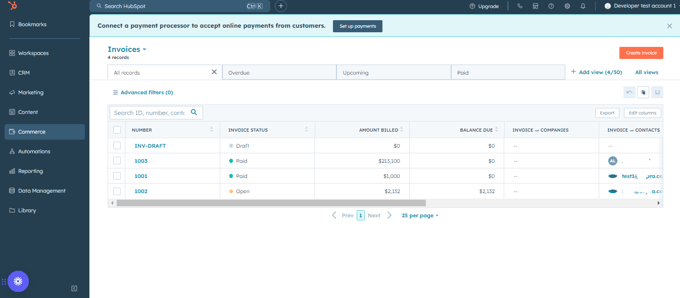
An advantage of HubSpot invoicing is that it provides tracking features that allow you to monitor the status of your invoices and payments right within your HubSpot instance. This includes the ability to see which invoices have been sent, which have been paid, and which are overdue. You can also set up automatic reminders to follow up with customers who have not paid their invoices on time. You will be able to improve your cash flow and reduce the number of overdue payments.
In addition to tracking individual invoices, HubSpot invoicing also offers reporting features. You can generate reports on your overall invoicing performance, including overdue invoices and revenue. Moreover, you can use these reports to identify areas for improvement.
User Experience
HubSpot invoicing is designed while keeping user experience in mind. The interface is intuitive and easy to explore, even for novice users, those who are not familiar with invoicing software. Additionally, you can customize the platform as per your specific needs and preferences.
Top Features of HubSpot Invoicing
HubSpot invoicing comes with amazing features. Some of them are discussed below.
Invoice Templates
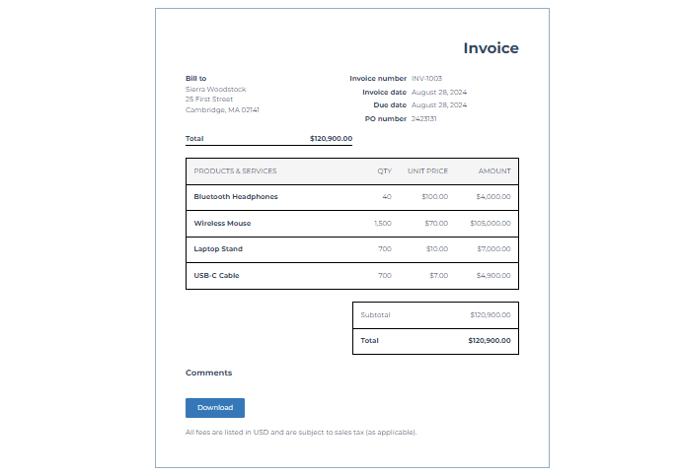
You can create customized templates for HubSpot invoicing. These templates allow you to design invoices that align better with your brand identity and reflect the unique style of your business. You can easily tailor the layout and colors of your invoices to create a professional and consistent look. This helps to build trust with your customers and improve your brand recognition.
Additionally, you can use custom fields to include information like service descriptions, providing a more informative experience for customers.
Automated Invoicing
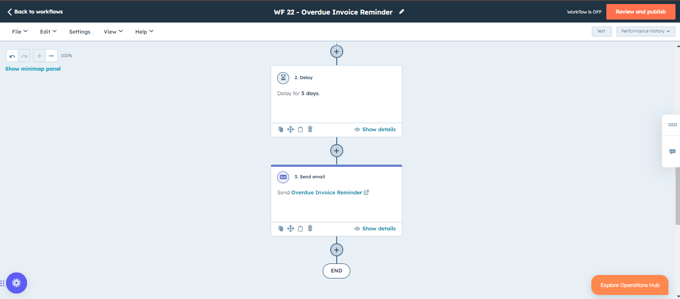
With HubSpot, you get a range of features for automating the invoicing process that can save you time and reduce human errors. You can create recurring invoices to ensure that customers are billed on time. Also, you can set up automated payment reminders to reduce the number of overdue payments and improve your cash flow. Moreover, you can free up your time to focus on other important tasks to improve productivity and efficiency.
Payment Integration
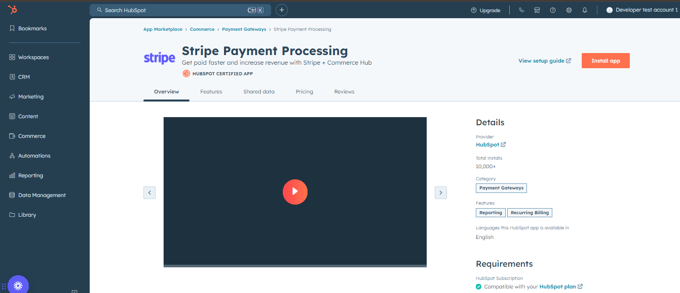
You can integrate popular payment gateways such as Stripe with your HubSpot invoicing. This allows you to accept payments directly from your customers and make it easier for them to settle their invoices. When you integrate your HubSpot invoicing account with a payment gateway, you can add a payment button to your invoices.
Customers can then click on the button to pay their invoices online using their preferred payment method. You will reduce the time it takes to collect payments and provide an efficient experience for your customers.
Financial Reporting
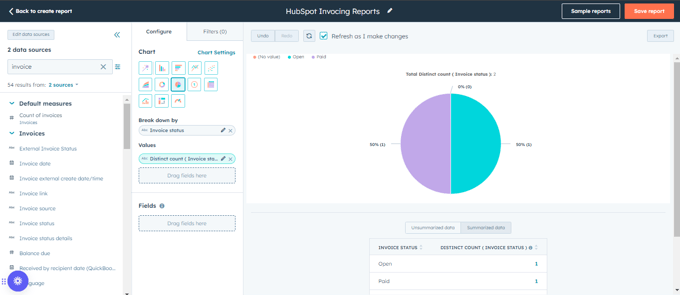
HubSpot invoicing provides reporting tools that allow you to track your revenue and payment statuses. You can use this information to make informed business decisions. Additionally, you can generate reports on a variety of metrics including total revenue, outstanding invoices, payment history, average payment time, etc. Using these reports, you can track your business’s financial performance over time.
Client Portal
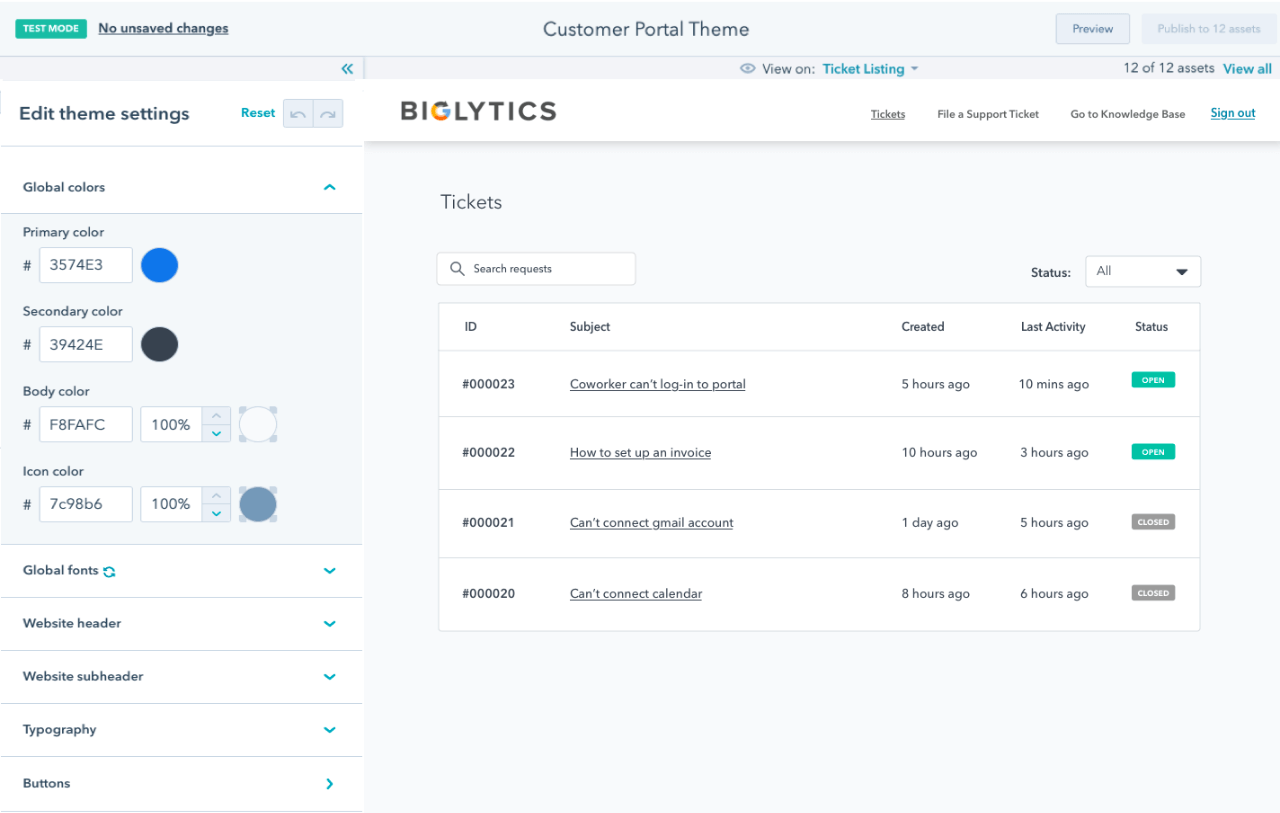
HubSpot invoicing includes a client portal that allows your customers to view and pay their invoices online. Your customers will have a more convenient and efficient experience, and this will also help to improve your cash flow. The client portal provides customers with a secure and easy-to-use interface for managing their invoices. They can view their invoice history, download them as PDFs, and make payments online.
Source: HubSpot
Limitations of HubSpot Invoicing
While HubSpot invoicing offers several features, it has its limitations. Some of these are mentioned below.
Feature Gaps
As compared to the features offered by specialized invoicing software that are designed specifically for the purpose, HubSpot invoicing falls short. These tools have advanced features such as time tracking, expense tracking, and project management integration. Additionally, they may offer a wider range of customization options and reporting capabilities.
Customization Limits
HubSpot allows for a degree of customization, but there may be limitations in terms of template formatting and design. For example, you may not be able to achieve a highly complex layout or include certain elements important for your business. This can impact the overall look and feel of your invoices and affect your brand perception.
Pricing
You have to know that HubSpot invoicing is usually included as part of a larger CRM package. However, the specific features included in the package may vary depending on the pricing plan you choose. This means that you may need to invest in a higher-tier plan to access all the features you require. Furthermore, if you have a larger number of invoices to process, the costs associated with HubSpot invoicing may become significant.
Integration Constraints
HubSpot invoicing does allow you to integrate with other tools, but there are still challenges when integrating it with third-party systems. This can be problematic if you rely heavily on other software for your business operations. For instance, if you use expert accounting software, you may encounter difficulties in syncing data between the two systems. A custom HubSpot integration from a partner can close that gap by syncing invoices and payment status with your accounting system. This can lead to inefficiencies and errors if not managed properly.
How to Set up HubSpot Invoicing
You can send invoices directly from HubSpot and get paid. Your buyers can expect a similar checkout process to payment links. Here is a step-by-step guide on how you can easily set up HubSpot invoicing.
Step 1: Configure and Customize Invoice Setting
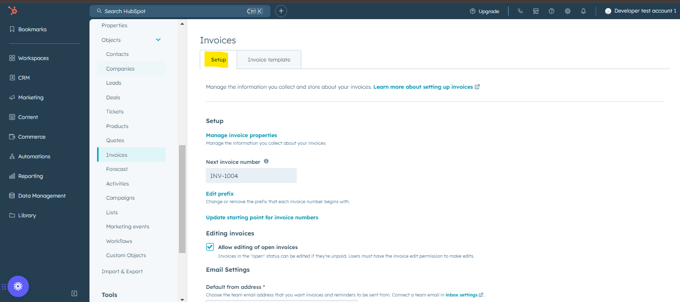
You can personalize your invoices by customizing the prefix and starting number. You can find the option in the settings menu on the left sidebar in Settings. Go to Object > Invoices. By default, HubSpot invoices have the prefix INV and a starting number of 1001. This way, you can keep track of your invoices and maintain consistency in your numbering system.
When you have assigned a number to the invoice like INV-1004, and it has been finalized, you will not be able to change it.
Step 2: Turn on Edit Open Invoices
If you need to make changes to an invoice after it has been sent, you will have to enable edit access. From the left sidebar menu in the settings, go to Objects > Invoices. Then, select the checkbox stating Allow editing of open invoices, and then click Save. This gives you flexibility in case of errors or changes in the order.
Step 3: Set Default Email Address
You have to specify the email address that will be used to send invoices. This can be your team email address. In Invoices, under the Email settings, select Default from address and then click the apt email address. Click Save.
Step 4: Edit Custom Fields
If you want to capture specific information relevant to your business, customize your invoices with custom fields. Click the Invoice template tab and then under Template customization, select Set default custom fields.
Step 5: Add a Custom Title
Create a custom title for your invoices to make them more professional. For example, “Your Company Name: Invoice.” For this, again click the Invoice template tab and select the Use custom document title. Enter a new title and then click Save.
Step 6: Add a Default Comment
You can include a default comment to provide information or instructions to your customers. This could be a reminder to pay by a certain date or a link to your company’s payment terms.
Step 7: Add Tax IDs
If applicable, add your company’s tax identification numbers to your invoices. This is important for compliance purposes and can help to streamline the payment process. In the Invoice template, click the Add tax ID and select a type, type Tax ID, and then click Save.
Step 8: Remove Sales Tax Notice
If you are not required to collect sales tax or already have it integrated into your payment gateway, you can remove the default sales tax notice from your invoices.
Conclusion
HubSpot invoicing offers excellent solutions for businesses that want to streamline their invoicing processes. It has several features but comes with its limitations. Follow the step-by-step guidelines to set up HubSpot invoicing and optimize your operations.