
Updated:
If you are running a business in 2025, chances are that you have already heard about HubSpot. It is a customer relationship management (CRM) platform that helps businesses manage their marketing, sales, customer service, and website in one place. Instead of juggling separate tools for email marketing, lead tracking, customer support, and website management, HubSpot brings them together under a single system.
But one of the first questions people ask is, “How much does HubSpot cost?” The answer is not as simple as a single number. HubSpot uses a modular pricing model, which means that the cost depends on which tools you need, the size of your business, and how advanced your requirements are.
This guide provides a detailed guide on the HubSpot pricing structure. Let’s explore together.
HubSpot Pricing Structure Overview
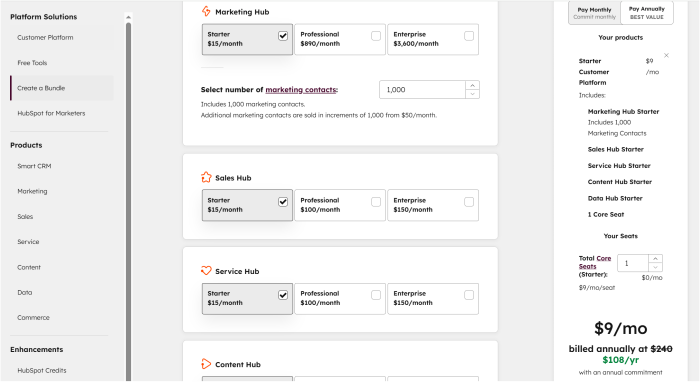
HubSpot’s pricing is built on flexibility, which is one of the reasons it appeals to businesses of all sizes. Rather than locking you into a single, rigid package, HubSpot allows you to choose from a variety of hubs that address specific needs. Each hub is structured into four tiers,
-
Free
-
Starter
-
Professional
-
Enterprise
This lets you start with small plans and scale as your business expands. This modular approach ensures you only pay for what you use, making it cost-effective.
The Free plan provides the essentials to get started, and the Starter plan adds key features for small businesses wanting to scale. The Professional package adds automation, reporting, and advanced features for easier scaling.
For larger organisations, the Enterprise plan offers high-level customisation, more in-depth analytics, and advanced team management features. With such a tiered model, HubSpot guarantees that whether you are a start-up or a large enterprise, there is a package that will suit your needs and budget.
Source: HubSpot
Here is a breakdown of the main hubs:
| Marketing Hub | Helps businesses attract leads, run email campaigns, manage ads, and automate marketing tasks. |
| Sales Hub | Gives sales teams tools to track deals, manage pipelines, schedule meetings, and streamline the sales process. |
| Service Hub | Focuses on customer support with tools like ticketing, live chat, surveys, and knowledge bases. |
| Content Hub | Provides website management, SEO optimisation, hosting, and dynamic content tools. |
| Data Hub | Ensures your business data stays synced, automated, and accurate across multiple platforms. |
Each hub can work independently, which is great for businesses with specific needs. However, when combined, they create a fully integrated ecosystem that covers marketing, sales, service, and data all in one place.
For companies looking to simplify their tech stack, HubSpot also offers bundled CRM Suites, which provide discounts when subscribing to multiple hubs together. This makes it easier to access a complete business solution without juggling different software providers.
HubSpot Free Tools
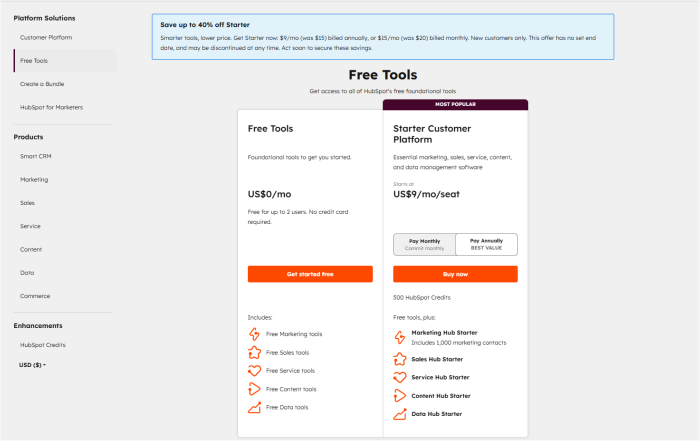
HubSpot is one of the few marketing platforms that sells free tools, which is why it's so popular with marketers. Unlike other platforms that lock most features behind paywalls, HubSpot provides you access to an unexpectedly comprehensive set of tools for free.
This makes it suitable for small businesses or entrepreneurs who want to test out CRM and marketing without having to invest a large amount of money upfront.
Core Features of the HubSpot Free Plan
With the free plan, you get a CRM (Customer Relationship Management system) that allows you to store and manage up to a million contacts at no cost. You also get email marketing basics, which let you send campaigns, track opens and clicks, and nurture leads.
Source: HubSpot
Additionally, HubSpot includes live chat and chatbot tools to connect with website visitors in real time, offering better engagement even without a dedicated support team.
Tracking and Reporting Made Simple
Another valuable feature is contact and deal tracking, which enables you to follow the customer's journey from the initial interaction to the final sale.
On top of this, you gain access to basic reporting dashboards, helping you monitor performance without needing advanced analytics. For businesses just starting out, these tools cover the essentials of marketing and sales data.
Room to Grow with Paid Plans
The best part? You can grow into paid hubs over time. Many businesses start with the free plan, then upgrade to Starter, Professional, or Enterprise as they need more automation, deeper reporting, or advanced features.
This makes HubSpot not just a free starting point, but also a scalable long-term solution that grows alongside your business.
Detailed Pricing Breakdown by Hubs
Now, we will break down HubSpot pricing for each hub.
Marketing Hub Pricing
The Marketing Hub is designed for businesses that want to attract leads, nurture them through email campaigns, and convert them into paying customers.
Best For: Small businesses thrive on the Free and Starter plans, while Professional and Enterprise are tailored to scaling companies with more advanced requirements.
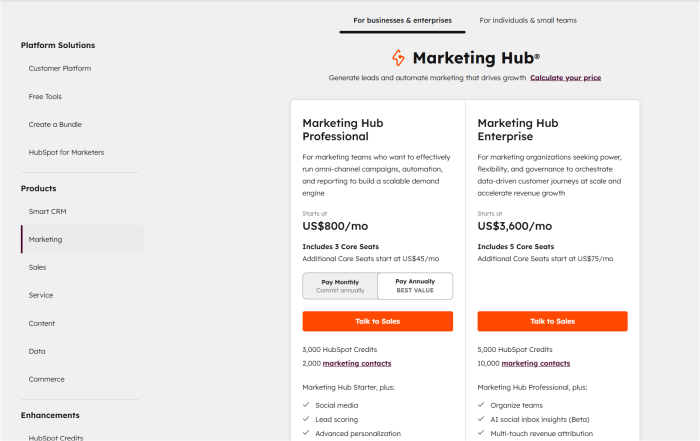
| Free Plan | Includes forms, email marketing, live chat, and a basic CRM. Perfect for small teams experimenting with inbound marketing. |
| Starter ($15-$50 per month) | Removes HubSpot branding, adds ad management, and introduces simple automation. A strong option for small businesses that are ready to take their marketing seriously. |
| Professional ($890-$1,000 per month) | Offers workflows, advanced automation, A/B testing, custom reporting, and social media tools. This tier is built for growing companies that need smarter marketing strategies. |
| Enterprise ($3,600+ per month) | Unlocks advanced features such as multi-touch revenue attribution, adaptive testing, and team permission controls. Best suited for large enterprises with complex marketing operations. |
Source: HubSpot
Sales Hub Pricing
The Sales Hub helps teams manage deals, track pipelines, and streamline the sales process for better efficiency.
Best For: Smaller companies can benefit from Starter plans, while large organisations use Professional and Enterprise to leverage AI-driven insights and forecasting.
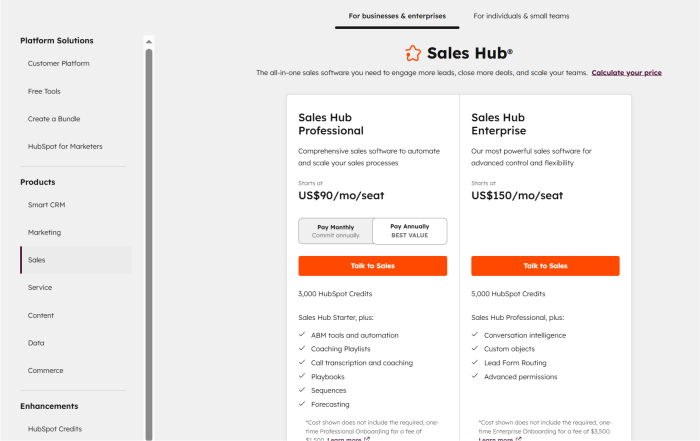
| Free Plan | Provides basic contact management, a meeting scheduler, and live chat. Great for individual reps or very small teams. |
| Starter ($15-$50 per user per month) | Adds sales sequences, deal management, and simple automation. Designed for small businesses ready to bring structure to their sales approach. |
| Professional ($500-$600 per month) | Features advanced reporting, forecasting tools, and deal scoring. Ideal for growing teams that need more visibility into their sales pipeline. |
| Enterprise ($1200+ per month, up to 10 users) | Includes predictive lead scoring, custom objects, and advanced team permissions. This is best for enterprises with larger, more complex sales operations. |
Source: HubSpot
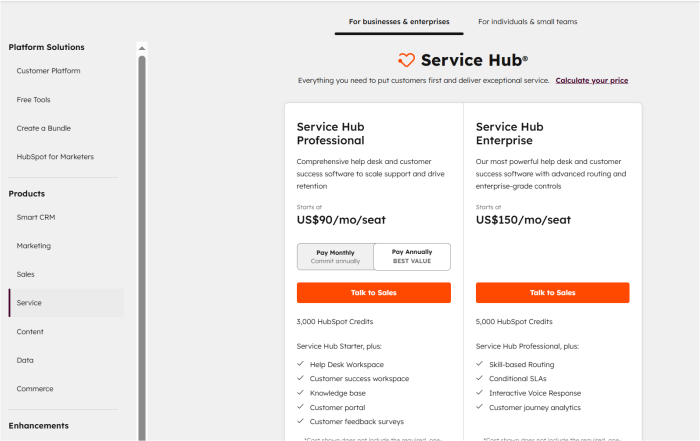
Service Hub Pricing
The Service Hub is built for businesses that want to deliver excellent customer support and maintain high satisfaction.
Best For: Suitable for businesses of any size that want predictable pricing while improving their customer experience.
| Free Plan | Covers ticketing, basic chat support, and email tracking. A helpful option for very small support teams. |
| Starter ($15-$50 per month) | Adds conversation routing and light automation. Perfect for businesses scaling up their support processes. |
| Professional ($450-$500 per month) | Provides help desk automation, customer feedback surveys, and a knowledge base for self-service support. This works well for companies managing frequent customer queries. |
| Enterprise ($1200+ per month) | Unlocks advanced routing rules, customer portals, and detailed team management features. Best suited for larger organizations with dedicated support departments. |
Source: HubSpot
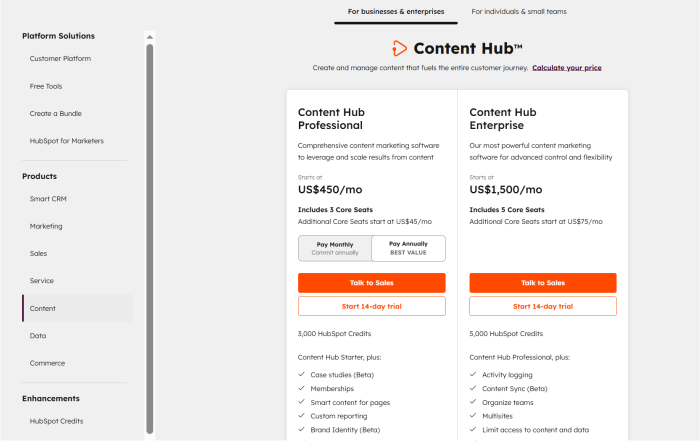
Content Hub Pricing
The Content Hub powers websites with tools for content management, SEO, and performance optimization.
Best For: Businesses that want a reliable, secure, and easy-to-manage website integrated with their marketing tools.
| Starter ($15 per month) | Offers website hosting, drag-and-drop editing, and essential security. A simple choice for small businesses creating their first site. |
| Professional ($400 per month) | Adds SEO tools, dynamic content, and A/B testing to improve website performance. This tier suits growing companies focusing on user experience. |
| Enterprise ($1200+ per month) | Provides advanced security, governance, and scalability features. Ideal for enterprises managing high-traffic websites or operating across multiple regions. |
Source: HubSpot
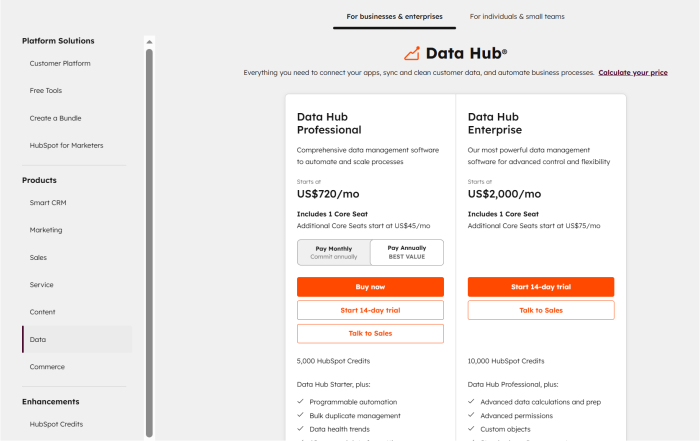
Data Hub Pricing
The Data Hub keeps your business data clean, synced, and reliable across all systems.
Best For: Any business that relies on multiple software tools and wants smooth, reliable data syncing without manual work.
| Free Plan | Allows basic data syncing across different apps. A great start for businesses using multiple platforms. |
| Starter ($20 per month) | Unlocks programmable automation to clean and format customer data automatically. |
| Professional ($800 per month) | Introduces advanced automation features and data quality management, which makes it perfect for companies with large and complex datasets. |
| Enterprise ($2000+ per month) | Offers high-level data governance, advanced reporting, and enterprise-grade automation. Best for organizations managing vast amounts of data across departments. |
Source: HubSpot
What Is HubSpot’s Seat-Based Model
HubSpot's pricing model has evolved to be more flexible and transparent, particularly with its shift to a seat-based model. Instead of charging a flat rate per hub and having minimum user requirements, HubSpot now ties the cost to the number and type of users who need editing access to the platform. This change gives businesses more control over their expenses, allowing them to pay only for the licenses they need.
Seat Types
HubSpot's seat-based model is built on three main types of seats, each with a specific purpose and cost.
| View-Only Seats | These seats are free and unlimited for all paid portals. They're designed for users who need to view data, reports and dashboards without the ability to create, edit, or delete information. This is ideal for managers or executives who need to monitor performance and stay informed without actively working in the system. |
| Core Seats | A Core Seat gives a user access to the features and tools included in the purchased hubs. This is the base paid seat and is necessary for anyone who needs to actively manage or edit data, create content, or build workflows within the platform. Core seats are suitable for marketers, operations professionals, and administrators. |
| Sales & Service Hub Seats | These are paid seats that include all the functionality of a Core Seat, plus access to the advanced tools and features of the Sales Hub or Service Hub Professional and Enterprise tiers. These seats are specifically for sales reps and customer service agents who need tools like sales sequences, forecasting, calling features, and ticket routing. |
How it Works
The new model makes it easier to scale. When you purchase a Professional or Enterprise hub, you receive a certain number of Core Seats or a per-seat price. You can then add more seats of any type as your team grows, ensuring you do not overpay for licenses. This also eliminates minimum seat requirements that were previously in place for some hubs, which makes it more affordable for small teams to access advanced functionality.
HubSpot Bundles and Packages
While you can purchase each hub separately, HubSpot also provides bundled packages known as CRM Suites. These bundles are designed to give businesses access to multiple hubs at a lower cost than buying them individually. For companies that need marketing, sales, service, and data tools working together, a bundle is often the most cost-effective choice.
Source: HubSpot
Starter CRM Suite
The Starter CRM Suite costs around $50 per month and includes entry-level tools from the Marketing, Sales, Service, Content, and Data Hubs. It’s a perfect fit for small teams or start-ups that want an affordable, all-in-one solution without the hassle of managing multiple software subscriptions.
Professional CRM Suite
The Professional CRM Suite, priced at around $1,780 per month, combines mid-tier features from each hub. This bundle is designed for growing businesses that need more automation, deeper analytics, and stronger collaboration tools.
It is particularly useful for companies that have outgrown basic tools and want to streamline processes across departments.
Enterprise CRM Suite
The Enterprise CRM Suite starts at $5,000 per month and offers the most advanced features across all hubs. From complex marketing automation to large-scale sales forecasting and advanced customer service portals, this package is tailored for large organisations with complex operations. It provides scalability, governance, and high-level reporting features that enterprises need.
Why Bundles Make Sense
If you choose a bundle, it can save your business significant money compared to subscribing to each hub individually. More importantly, bundles ensure that all tools work seamlessly together, reducing integration issues and giving teams a centralised platform to manage everything from leads to customer support.
If your business needs multiple hubs, opting for a bundle is usually the smarter, more efficient choice.
Factors That Affect HubSpot Pricing
When it comes to HubSpot, the price you pay depends on a few key elements.
1. Number of Users
For the Sales Hub and Service Hub, pricing is based on the number of users. The more people on your team who need access, the higher your monthly bill will be. This makes it important to plan which team members genuinely need HubSpot licenses.
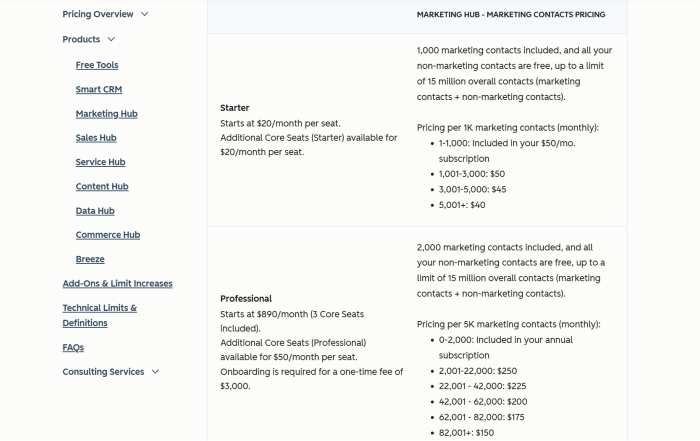
2. Contacts Volume
In the Marketing Hub, costs increase as your contact database grows. If you’re running large-scale email campaigns or storing thousands of leads, expect your pricing tier to go up. Businesses with leaner contact lists can usually stay on more affordable plans.
Source: HubSpot
3. Features Needed
Advanced capabilities like AI-powered insights, custom objects, and reporting dashboards come at a higher price. If your business requires these premium features, you will likely need to subscribe to Professional or Enterprise plans.
4. Bundles vs. Individual Hubs
Buying hubs individually can get expensive if you need multiple tools. HubSpot’s CRM Suite bundles often provide better value by combining hubs at a discounted rate, which makes them a cost-effective option for growing businesses.
5. Onboarding Costs
For Professional and Enterprise plans, HubSpot typically charges a one-time onboarding fee. This is designed to help businesses set up and customize their system, but it is an additional cost to factor into your budget.
Pricing Comparison of HubSpot vs Competitors
HubSpot is often stacked against other popular CRM and marketing platforms. Each competitor has its strengths, but HubSpot stands out for its balance of ease of use and all-in-one capabilities.
HubSpot vs Salesforce
Salesforce is highly customisable and powerful, and that makes it a top choice for enterprises with complex needs. However, it has a steep learning curve and often requires dedicated administrators. HubSpot, on the other hand, is more user-friendly and easier to implement, but can become expensive as your team and contacts scale.
HubSpot vs Zoho CRM
Zoho CRM is one of the most affordable options. It offers basic CRM tools at a lower price. However, it lacks the advanced depth and integration capabilities that HubSpot provides. For businesses focused on long-term growth and scalability, HubSpot is usually the stronger option.
HubSpot vs Mailchimp
Mailchimp shines as a budget-friendly email marketing tool, but it is limited when it comes to sales and service management. HubSpot goes far beyond email by combining CRM, marketing automation, and sales pipelines into a single system.
Conclusion
HubSpot’s pricing is flexible, scalable, and designed to suit businesses of all sizes. With hubs for Marketing, Sales, Service, Content, and Data, as well as free tools for beginners, it provides solutions at every stage of growth.
While the cost can increase as your needs expand, HubSpot’s all-in-one ecosystem often proves more efficient than juggling multiple tools. Whether you are a small business exploring free features or an enterprise investing in advanced automation, HubSpot remains one of the most versatile platforms for driving business success.