
Every marketer wants to know one thing, and that is, what is really working? You might be running ads, publishing blogs, posting on social media, and sending emails, but which one actually drives results? Without tracking, it feels like guessing in the dark.
This is what attribution reporting is. It is the secret that helps understand which channels and campaigns deserve credit for conversions. Instead of guessing where leads came from, you can actually see the journey they took.
HubSpot makes this process simple with its built-in attribution reporting tools. From marketing to sales, it gives you the clarity you need to prove ROI and make smarter decisions.
What Is HubSpot Attribution Reporting?
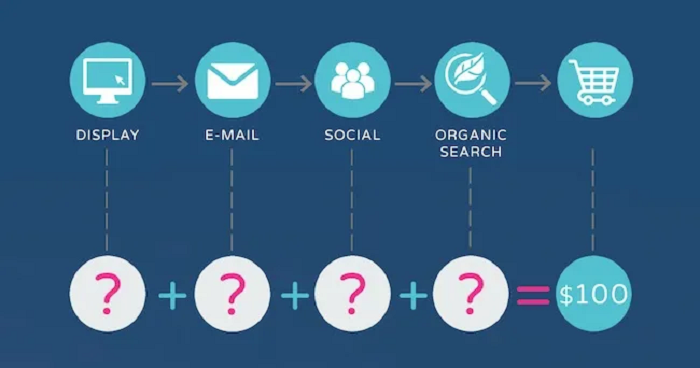
HubSpot attribution reporting tells you which marketing activities contributed to a lead becoming a customer. It is like a scorecard that shows who played a role in closing the deal.
Inside the HubSpot ecosystem, every click, email open, and form submission is tracked. HubSpot then uses attribution models to assign value to these actions, so you know which touchpoints had the biggest impact.
Businesses need this because marketing budgets are not unlimited. With HubSpot reporting tools, you can stop spending on things that do not work and double down on strategies that actually bring in revenue.
Why Attribution Reporting Matters for Marketers
Imagine spending thousands on ads but not knowing whether they generated any sales. This is the danger of working without proper attribution, because you end up relying on guesswork.
With marketing attribution, you get a clear picture of what is driving growth. No more vague “we think this campaign worked”. Instead, you can now have hard numbers.
For small businesses, this means stretching every pound wisely. For bigger teams, it is about justifying budgets and proving the ROI in HubSpot marketing reporting. Either way, attribution is your best friend.
Types of Attribution Models in HubSpot
Some people buy after a single ad, while others take weeks of emails, blogs, and demos before deciding. HubSpot attribution models are important because they help you decide how much credit to give each touchpoint along the way.
First-Touch Attribution
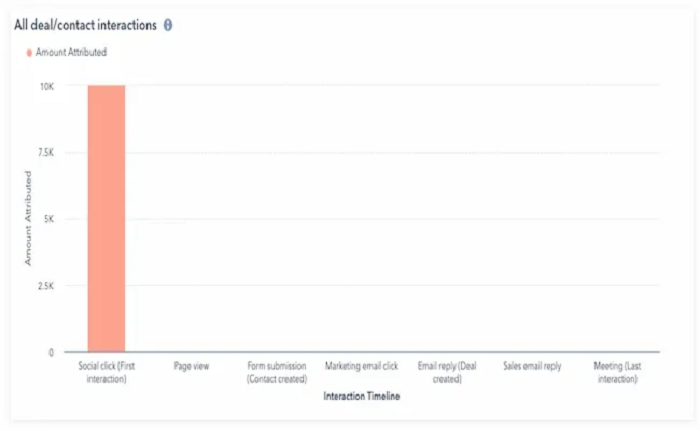
This model gives 100% of the credit to the very first interaction a lead has with your brand. For example, if someone discovered you through a Google search and clicked a blog post, that blog post gets full credit for the conversion.
It is especially useful if your goal is to see which channels are best at generating awareness and attracting new audiences.
Last-Touch Attribution
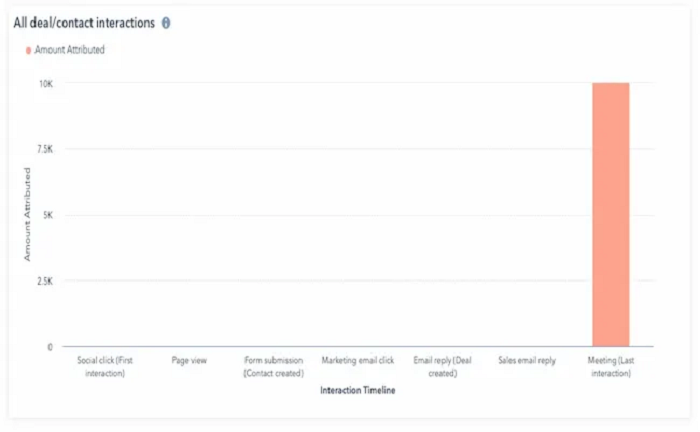
With this model, the final interaction before the conversion gets all the credit. Imagine a lead has been following your content for weeks, but the last email they received pushed them to book a demo. That email would take full credit under this model.
Moreover, this is a handy way to figure out which campaigns or activities are actually closing deals.
Multi-Touch Attribution
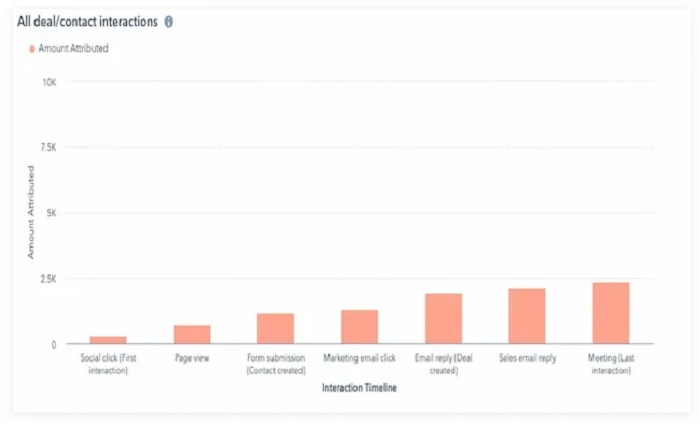
Unlike first or last-touch, this model spreads the credit across every interaction in the customer journey. If someone clicked a Facebook ad, read three blogs, attended a webinar, and then converted after a sales call, all of those steps would share the credit.
This is often the most realistic option for B2B or businesses with longer sales cycles, because it acknowledges that multiple touchpoints work together to drive results.
Time Decay Attribution
HubSpot also offers a time decay model, where more recent interactions are weighted higher than older ones. For example, if someone first found your brand six months ago but converted after attending a webinar last week, the webinar would get more credit.
This model is great when you want to highlight the channels that move leads closer to the finish line.
Other HubSpot Attribution Models
In addition to these, HubSpot provides several other models, including:
-
Linear Attribution - evenly splits credit across all interactions.
-
U-Shaped Attribution - gives more credit to the first and last interactions, while still recognizing the middle steps.
-
W-Shaped Attribution - gives weight to three key moments: the first touch, the lead creation touch, and the deal creation touch.
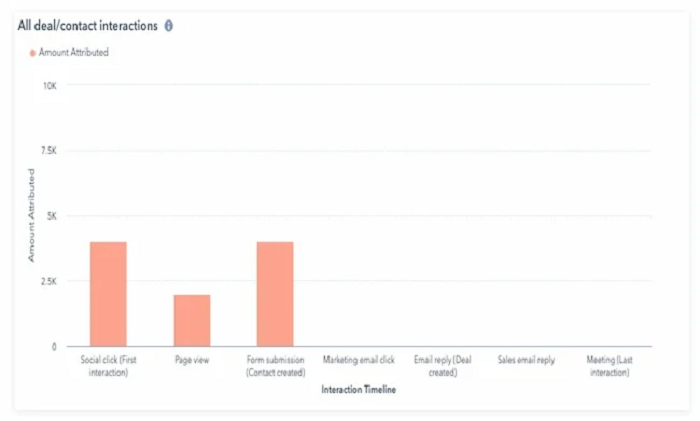 U Shaped Attribution
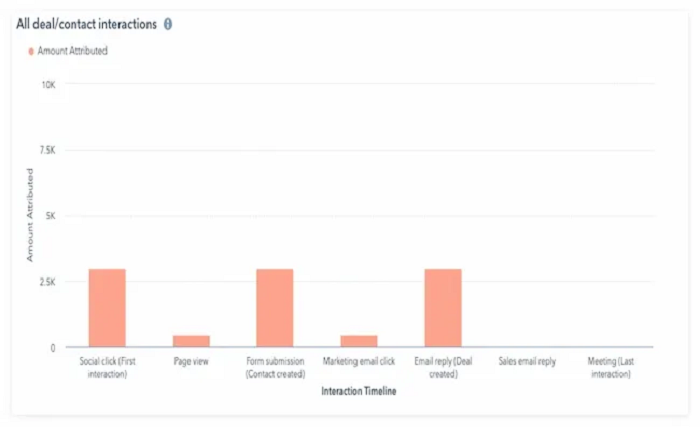 W Shaped Attribution
Setting Up Attribution Reporting in HubSpot
Getting your first attribution report set up in HubSpot is actually pretty straightforward. Here’s how to do it step by step:
Step 1: Open the Reports Tool
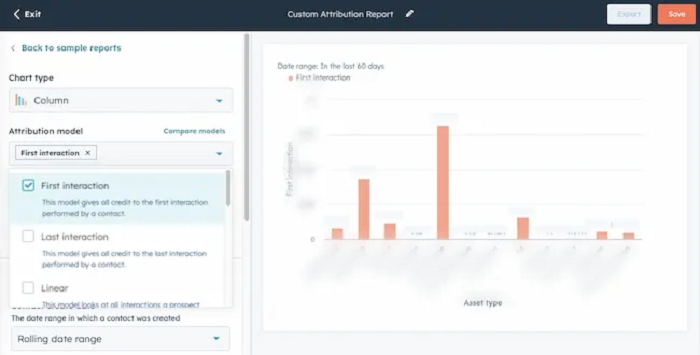
From your HubSpot dashboard, click on the Reports tab. Then look for and select Attribution Reports. This is where all the magic happens.
Step 2: Pick Your Attribution Model
Now you will need to decide how you want HubSpot to give credit for conversions.
-
First-touch means it gives full credit to the very first interaction a lead had with your business.
-
Last-touch gives all the credit to the final step before they converted.
-
Multitouch spreads the credit across every step in the journey.
If you are just starting out, multitouch is a good option because it gives you the most complete view.
Step 3: Filter the Data
Next, you can narrow things down to get more meaningful insights. For example, you might filter by campaign, marketing channel, or customer lifecycle stage. Let’s say you want to know if your Facebook ads are actually bringing in qualified leads, filters make that possible.
Step 4: Customize Your Report
Lastly, make the report work out. Decide what are the most important key numbers to you, such as the total revenue or the number of deals closed and the number of new leads. HubSpot also allows you to change the presentation of the data to be able to share it with your team members without overwhelming them.
Common Mistakes to Avoid in HubSpot Attribution Reporting
| Challenge | Solution |
| Relying on one attribution model only | Compare multiple models (first-touch, last-touch, multi-touch, etc.) to get a balanced view of the customer journey. |
| Incomplete or missing data | Integrate HubSpot with your CRM, ad platforms, and offline sales data to ensure every touchpoint is captured. Those connections are normally wired up during Marketing Hub implementation; if they were skipped, attribution will under-count whole channels. |
| Difficulty aligning marketing and sales teams | Create shared KPIs and reporting dashboards so both teams measure success in the same way. |
| Overvaluing last interactions | Use multi-touch or time decay models to highlight earlier touchpoints that also influenced the conversion. |
| Misinterpreting complex reports | Train teams to read HubSpot reports correctly and add context by comparing results with campaign goals. |
| Ignoring offline or manual activities | Manually log offline interactions (events, phone calls, trade shows) into HubSpot to maintain reporting accuracy. |
| Data overload leading to confusion | Focus only on the most relevant KPIs for your business goals, instead of tracking every possible metric. |
| Slow adoption of reporting tools | Provide step-by-step training and templates to help teams get comfortable with HubSpot attribution reports. |
Best Practices for Accurate Attribution in HubSpot
-
Use multiple attribution models instead of relying on just one.
-
Integrate HubSpot with your CRM, ad accounts, and other marketing tools for complete data.
-
Define clear KPIs (e.g., revenue, leads, lifetime value) before setting up reports.
-
Review and update attribution reports regularly to keep insights fresh. If no one owns that review internally, HubSpot consulting services can audit the model and the campaign setup behind it on a regular cadence.
-
Align marketing and sales teams on how success is measured.
-
Customize reports to focus on the metrics that matter most to your business.
-
Include offline and manual activities in HubSpot for a fuller picture.
-
Train your team to interpret attribution reports correctly.
-
Compare HubSpot attribution results with other tools (like Google Analytics) for cross-validation.
-
Share insights with stakeholders to prove ROI and guide budget decisions.
Real-Life Examples of HubSpot Attribution Reporting
Let’s bring this to life with a few examples of how businesses use attribution in HubSpot.
-
A content marketing team might use multi-touch attribution to prove their blogs are generating leads. Even if the blog wasn’t the last interaction, it played a role in the journey.
-
A paid ads team could rely on last-touch attribution to show which ad campaign finally convinced users to convert. This helps them optimize ad spend.
-
Meanwhile, social media managers might look at first-touch attribution to see which platforms are driving awareness and discovery.
HubSpot Attribution Reporting vs Other Analytics Tools
You may ask, why HubSpot, when such tools as Google Analytics exist?
The distinction lies in the fact that HubSpot attribution reporting is linked to your CRM, and, therefore, you can trace marketing activities to possible deals and revenue. Google Analytics is super when it comes to tracking the traffic of a website, yet revenue results are not always visible.
HubSpot can be easier to operate compared to Salesforce. It is more user-friendly, and it combines well with marketing tools.
With that said, a lot of companies operate HubSpot with the help of other tools such as Google Analytics in order to have a marketing and a web performance view.
HubSpot reporting tools have a huge advantage in terms of demonstrating ROI since it can be traced to the sales.
Conclusion
Attribution reporting is crucial to any business that is keen on growth at the end of the day. It removes the conjecture in the marketing field and substitutes it with facts.
HubSpot simplifies the process by providing pre-built attribution models, a smooth customization process, and simple integration with sales data.
HubSpot attribution reporting is something that you should start using now, not later. It is the simplest means of demonstrating what is and is not working and where you should concentrate your energies to produce the best outcomes.