
If you have been juggling your marketing and sales tools, chances are that you have come across Mailchimp and HubSpot.
Mailchimp is a widely used email marketing solution and HubSpot is a giant CRM (Customer Relationship Management) and marketing automation platform.
Suppose, now, that you merge them. Your marketing and sales activities can be synchronized together, as opposed to manually exporting and importing data or manoeuvring between dashboards.
That is what the Mailchimp HubSpot integration is all about.
If you are a marketer, sales professional, or CRM manager, this guide is for you. By the end, you will know exactly how to bring these two tools together and maximize your marketing automation efforts. So, let’s start together.
Benefits of Integrating Mailchimp with HubSpot
Before jumping into the “how-to,” let’s look at the “why.” What makes the Mailchimp HubSpot sync worth your time? Here are some of the biggest benefits:
1. Unified Contact Management
No more maintaining two separate contact lists. When you integrate, your contacts sync between Mailchimp and HubSpot. That means when someone signs up through your HubSpot form, they can automatically be added to your Mailchimp email list.
2. Improved Marketing Automation
HubSpot already has great workflows, but including Mailchimp makes your email campaigns supercharged. Indicatively, a lead downloading an eBook within HubSpot can immediately receive a specific Mailchimp email campaign.
3. Improved Customer Segmentation
With integration, you can create smarter segments. Instead of just grouping people by location or signup date, you can combine HubSpot’s CRM data with Mailchimp’s behavioral insights (like email clicks and opens).
4. Better Reporting and Analytics
Want to know how your email campaigns influence sales? With integration, Mailchimp’s email engagement data flows into HubSpot. This gives you a clearer picture of the customer journey, from first touchpoint to conversion.
Prerequisites Before You Start
Before connecting the two platforms, there are a few boxes you will need to tick.
-
You will need active accounts on both platforms. Free plans work to a certain extent, but advanced features usually require paid subscriptions.
-
Make sure you have admin access. Without it, you will not be able to authorize connections or manage integrations.
-
Check for subscription plan compatibility
-
HubSpot: Free CRM works with basic integrations, but advanced workflows may require a Marketing Hub subscription.
-
Mailchimp: Free plans support integration, but some automation features are locked behind paid tiers.
-
-
If you are considering custom integration, you will need API access. Both HubSpot and Mailchimp provide APIs, but keep in mind:
-
Free plans often have API call limits.
-
Heavy syncing might require paid tiers for scalability.
-
How to Connect Mailchimp to HubSpot: Step-by-Step Guide
In the case of Mailchimp HubSpot integration, there is no single way to do it. Three major paths are available to you depending on your technical skills, business requirements and budget. We will see a breakdown of them to make you understand which one fits you better.
1. Using Native Integration (if available)
HubSpot used to have a direct connection to Mailchimp and it may still appear on the HubSpot App Marketplace depending on your subscription and type of account. This is definitely the simplest way to do it although there are a few drawbacks.
-
Log in to your HubSpot account.
-
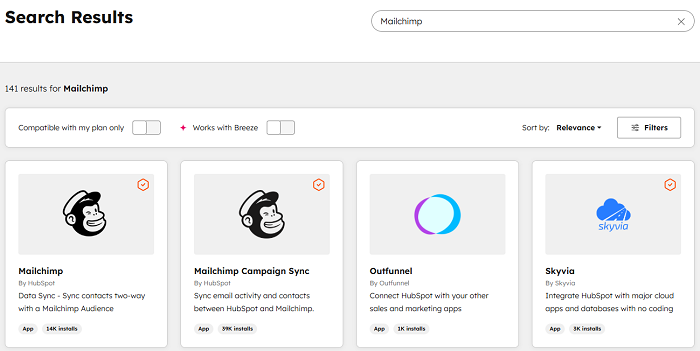
From the main dashboard, go to the App Marketplace (you’ll usually find this in the top navigation bar).
-
Use the search bar to type in Mailchimp.
-
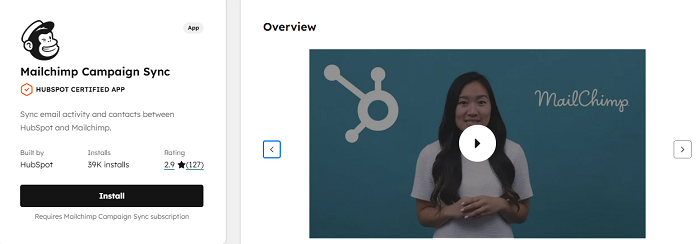
Click on the Mailchimp app listing.
-
Hit the Connect App button.
-
You will be redirected to Mailchimp, where you can log in with your credentials.
-
Once logged in, click Authorize to give HubSpot access to your Mailchimp account.
And just like that, the connection is made.
What You Can Do with Native Integration:
-
Sync basic contact information between HubSpot and Mailchimp.
-
View Mailchimp campaign activity (like email opens and clicks) directly in HubSpot.
-
Automatically add HubSpot contacts to Mailchimp lists.
| Pros | Cons |
| Super quick to set up. | Very limited features, mostly just contact syncing and campaign activity tracking. If you only keep Mailchimp for email, a full Mailchimp to HubSpot migration often removes the need for a sync altogether. |
| Doesn’t require coding or third-party tools. | May not support advanced automation or custom workflows. |
| Works well for small teams just getting started. | Depending on updates, the native integration may not always be available for all accounts. |
2. Using Third-Party Tools (Zapier, PieSync, Automate.io, etc.)
If you want more flexibility without hiring a developer, third-party integration tools are the sweet spot. Platforms like Zapier, PieSync, or Automate.io act as the “middleman” that connects HubSpot and Mailchimp.
Out of these, Zapier is the most widely used, so let’s focus on that.
Example Workflow with Zapier:
Let’s say you want every new contact added in HubSpot to also be added to a Mailchimp subscriber list automatically. Here’s how that would look:
-
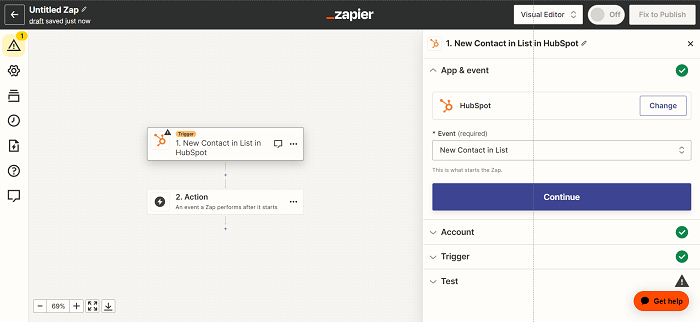
Trigger: A new contact is created in HubSpot.
-
Action: Zapier sends that contact info over to Mailchimp and adds/updates them in the right list.
Steps to Set Up Zapier Integration:
-
Sign in to your Zapier account (or create one if you don’t have it).
-
On your dashboard, click Create Zap.
-
For the Trigger App, search for HubSpot.
-
Choose the trigger event (e.g., “New Contact”).
-
Connect your HubSpot account and test the trigger.
-
For the Action App, search for Mailchimp.
-
Choose the action event (e.g., “Add/Update Subscriber”).
-
Connect your Mailchimp account and map the fields (for example, “First Name” in HubSpot should match “First Name” in Mailchimp).
-
Test the action to make sure the data flows correctly.
-
Hit Turn On Zap and you are good to go.
| Pros | Cons |
| Extremely flexible with tons of prebuilt workflow options. | Cost increases as your automation volume grows (Zapier pricing is based on “tasks” used). |
| No coding required, anyone can set it up. | Relies on a third-party platform, if Zapier goes down, your workflows stop. |
| Great for teams that want automation without the complexity of APIs. | Field mapping can sometimes cause confusion if not carefully managed. |
3. Using Custom API Integration
A more complex API integration is the strongest option in case your business has its more sophisticated needs, or an available development team. This lets you have complete control of the communication between HubSpot and Mailchimp.
You can opt for custom integration when:
- You need two-way syncing (HubSpot ↔ Mailchimp) with very specific rules.
- You want to automate complex workflows that tools like Zapier don’t support.
You’re managing a large database with thousands (or even millions) of contacts, and performance optimization is key.

Basic Overview of How It Works:
-
Mailchimp API: Lets you fetch subscriber data, update contact details, or trigger campaign actions.
-
HubSpot API: Allows you to push CRM events, update records, or pull engagement analytics.
-
You (or your developers) create a middleware application that sits between HubSpot and Mailchimp, handling data syncing and applying custom logic. If you have no developers in-house, HubSpot integration services can build and host that middleware for you.
-
Automatically send a Mailchimp email sequence when a lead score in HubSpot hits a certain threshold.
-
Build a two-way sync that updates both systems instantly whenever a contact changes.
Key Features After Integration
So, what happens once you have connected Mailchimp and HubSpot? Here is what you unlock through Mailchimp HubSpot integration:
1. Contact Syncing
-
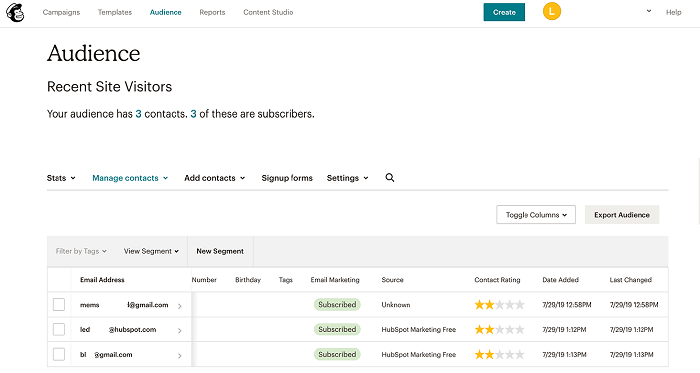
New leads in HubSpot are automatically added to Mailchimp lists.
-
Updates in Mailchimp (like unsubscribes) are reflected in HubSpot.
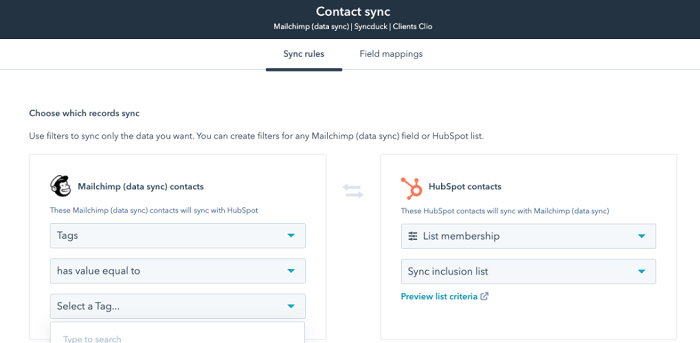
2. Tag and List Mapping
- Match Mailchimp tags with HubSpot properties.
- Maintain consistency in your segmentation across both platforms.
3. Automated Workflows
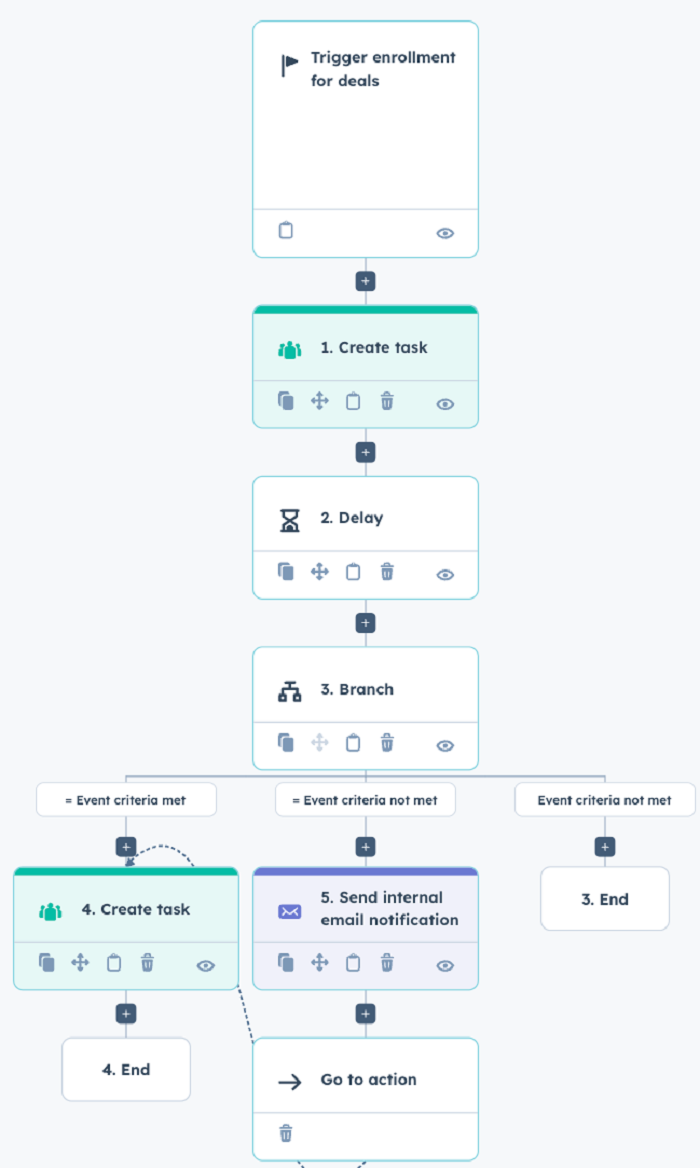
-
Trigger Mailchimp email campaigns from HubSpot actions.
-
Example: A lead fills out a HubSpot form → Mailchimp sends a welcome email.
4. Email Campaign Tracking
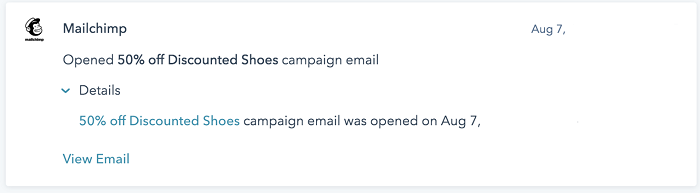
-
Mailchimp email opens, clicks, and bounces show up in HubSpot.
-
Sales teams can see which emails a prospect engaged with before calling.
5. Lead Scoring and Segmentation
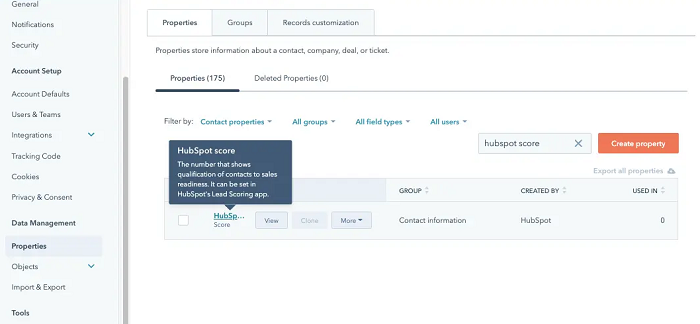
-
Use Mailchimp engagement (opens, clicks) to boost HubSpot lead scores.
-
Create smarter segments to deliver more personalized content.
Common Challenges and How to Solve Them
| Challenge | Problem | Solutions |
| Duplicate Contacts | Contacts appear multiple times in your lists. | Use HubSpot’s duplicate management tools. Regularly audit Mailchimp lists. Set rules in Zapier or APIs to avoid duplicates. |
| Data Mismatches | A contact’s info in Mailchimp doesn’t match HubSpot. | Map fields carefully during setup. Standardize naming conventions (e.g., “First Name” vs. “FName”). |
| Email Opt-in/Opt-out Sync | Someone unsubscribes in Mailchimp but still gets HubSpot emails. | Enable two-way sync for unsubscribes. Regularly test your unsubscribe workflows. |
| Sync Delays or Errors | New contacts don’t appear instantly. | Check API limits (especially on free plans). Monitor Zapier task history for errors. Schedule regular syncs if real-time isn’t required. |
Best Practices for Successful Integration
Want your integration to run smoothly long-term? Here are some Mailchimp HubSpot integration tips to follow:
Tip 1: Clean Your Contact List Before Syncing
-
Remove inactive or bounced emails.
-
Standardize contact fields to prevent mismatches.
Tip 2: Use Consistent Tagging Conventions
-
Decide on a naming system for tags (e.g., “Webinar_Sep2025”).
-
Apply the same system in both HubSpot and Mailchimp.
Tip 3: Schedule Regular Audits of Synced Data
-
Once a month, check for duplicates or errors.
-
Compare reports from both platforms to spot inconsistencies.
Tip 4: Monitor Performance Analytics
-
Track email engagement in Mailchimp.
-
Compare it with the conversion data in HubSpot.
-
Use this insight to refine your campaigns.
Tip 5: Start Simple, Then Scale
-
Begin with basic syncs (e.g., contacts).
-
Gradually add workflows like automated campaigns or lead scoring.
Conclusion
The Mailchimp HubSpot integration is one of the smartest moves you can make if you want your marketing and sales teams to work together seamlessly. Instead of juggling two separate platforms, you bring them into one connected ecosystem.
With integration, you get:
-
Unified contacts.
-
Smarter automation.
-
Better reporting.
-
Happier teams.
Yes, you will encounter some troubles such as duplicates or delays in syncing but with the correct configuration, and good practices, they are not hard to handle. To make an easy and effective integration, you can also hire an agency of reliable HubSpot partners such as 3 & Four Technologies.
Thus, be it native integration, or a third-party integration such as Zapier, or even a custom API connection, the conclusion is the same, integrating Mailchimp and HubSpot is a game-changer to your business.
Keep things small, keep things constant and watch your marketing automation fly.